Pages

Showing posts with label CyberSmart. Show all posts

Thursday, 22 June 2017

CyberSmart: Smart Commenting

L.I: to write a smart comment on other peoples blogs.
L.I: to comment on other schools blog-posts.

This week for cyber smart, we did more smart commenting. We did another person at Tamaki Primary's blog post, and commented on someone in LS2. A smart comment is a comment that includes these things. A positive attitude, a question, encouragement, and a formal greeting.


Friday, 9 June 2017

CyberSmart: Smart Commenting

L.I: To make and post a smart comment.

This week as a short lesson for CyberSmart, we learnt about what a smart comment is, and how to create one. We had to find someone that did the same work as us and blogged it, and made sure they weren't a friend of ours, and we needed to be positive in our comment.
A smart comment needs to include these things: A positive attitude, 1 or more questions, encouragement, feedback, and a formal greeting e.g Greetings / Hello / Good morning / afternoon. The greeting isn't casual like, e.g Hey / Sup / Hi / Hey, like you would say to your friends.

My Comment:

Wednesday, 22 March 2017

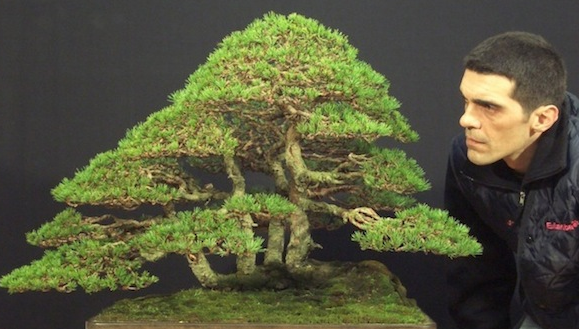
Pinus Silvestris The Worlds Fourth Best Bonsai Tree

L.I: to write a complete blog post by using a fact about Japan

I learnt about the Pinus Silvestris, a bonsai tree piece of artwork by Stefano Frisoni which is the fourth greatest bonsai piece of artwork in the world.

Chris and I (The year four partner I was working with) learnt about this fact by searching on google the best Bonsai trees in the world. We found a site with the ten most greatest bonsai trees in the world, and we could have chosen the best bonsai trees, but we instead chose the fourth.

Screenshot 2017-03-22 at 12.16.43 PM.png
^ ^
I I
Pinus Silvestris Stefano Frisoni

Friday, 25 November 2016

CyberSmart

This week for CyberSmart we played CyberSmart the game. What you do is you roll a dice and how ever many numbers you get that is how many times you move, and when you land on something when you click on it there will be a task for you to do. I landed on a square where you take a photo of you and your partners and edit it with an editing site and show the before and after photo.


Monday, 25 July 2016

Attributing Images

Link To Photo Is Here

Attributing Images

Photo Link Is Here

Attributing Images

Photo Link Is Here L.I To Attribute Images and to give the Author of the image Credit. 

We Had To Go To The Page Where The Image Came From And Get The Author Of The Image To Give Credit. We Had To Put The Link To The Page Where We Got The Image From On The Word Photo Before The Authors Name.